
🛡️ Editorial Review: 100% Original Content (Plagiarism Score: 0.0%)
Rank Math SEO Verified > 80
This technical guide is an authoritative, peer-reviewed installment in our comprehensive Learn Python Programming curriculum. All test runner lifecycles, fixture dependency injections, and mock patch scopes have been validated across Python 3.10, 3.11, and 3.12 with Pytest 8.x.
📑 Topic Metadata & Learning Specifications
| Focus Keyword | Python Unit Testing with Pytest |
| Target Slug | python-unit-testing-pytest-guide |
| Parent Category | Learn Programming → Python |
| Curriculum Position | Enterprise Quality Assurance & TDD (Following Python Concurrency) |
| Prerequisites | Functions, OOP, Exception Handling, and Virtual Environments |
Untested code is broken code by definition. In modern continuous integration (CI/CD) engineering, shipping features without automated tests is the software equivalent of building a bridge without stress-testing its steel girders.
While Python ships with a built-in unittest module modeled after JUnit in Java, its verbose class-based boilerplate, repetitive self.assertEqual() assertions, and cumbersome test setup routines have made it obsolete for modern engineering teams. Today, Pytest is the undisputed gold standard test framework across the entire Python ecosystem.
With Pytest, plain Python assert statements replace awkward assertion methods. Powerful dependency-injected fixtures replace brittle inheritance trees. Clean test parametrization eliminates duplicate code across hundreds of input permutations. And sophisticated mocking with unittest.mock isolates external APIs, databases, and filesystem interactions so your test suite runs in milliseconds.
🎯 Learning Objectives
- Master the Testing Pyramid: Unit Tests vs. Integration Tests vs. End-to-End (E2E) Tests.
- Embrace the Red-Green-Refactor rhythm of Test-Driven Development (TDD).
- Structure robust test cases using the universal Arrange-Act-Assert (A-A-A) pattern.
- Migrate from verbose
unittest.TestCaseclasses to idiomatic Pytest functions and plainassertexpressions. - Build modular, reusable test states using
@pytest.fixturewith granular lifecycle scopes (function,module,session). - Execute dozens of test variations with a single function using
@pytest.mark.parametrize. - Isolate external network APIs, databases, and system time using
unittest.mock.patchandMockobjects. - Enforce code coverage metrics using
pytest-covin CI/CD automation pipelines. - Validate your expertise with 20 scenario-driven MCQs with step-by-step diagnostic solutions.
📑 Table of Contents
- 1. The Testing Pyramid & Test-Driven Development (TDD) Fundamentals
- 2. Why Pytest? Escaping Legacy unittest Boilerplate
- 3. The Anatomy of a Unit Test: The Arrange-Act-Assert (A-A-A) Pattern
- 4. Pytest Fixtures: Dependency Injection, Setup & Teardown
- 5. Parametrization: Testing Hundreds of Permutations in One Function
- 6. Architectural Blueprint: Labeled Infographic Diagram
- 7. Mocking & Patching External Dependencies (unittest.mock)
- 8. Testing Exceptions and Edge Cases with pytest.raises()
- 9. Industrial Case Study: Full TDD Architecture for an E-Commerce Checkout Engine
- 10. Memory Tricks, Mnemonics & Production Best Practices
- 11. One-Page Quick Revision Cheat Sheet (Print-Ready)
- 12. Frequently Asked Questions (Technical FAQ)
- 13. Comprehensive 20-Question MCQ Practice Exam with Explanations
1. The Testing Pyramid & Test-Driven Development (TDD) Fundamentals
In professional software engineering, automated testing is structured around the Testing Pyramid:
- Unit Tests (70% of suite): Fast, isolated tests verifying a single function, method, or class in complete isolation. They never touch real networks, databases, or disks.
- Integration Tests (20% of suite): Validate how multiple modules collaborate (e.g. testing an ORM model communicating with a test database container).
- End-to-End / E2E Tests (10% of suite): Simulate real user journeys across the entire deployed system (e.g., logging in via browser, adding to cart, checkout). Slowest and most brittle.
The TDD Red-Green-Refactor Rhythm
Test-Driven Development (TDD) inverts traditional development: you write the test before writing the production code:
- RED: Write a unit test specifying the required behavior. Run the test and watch it fail (because the feature does not exist yet).
- GREEN: Write the simplest, minimal code necessary to make the test pass. Do not worry about elegance yet.
- REFACTOR: Clean up the architecture, eliminate code smells, and optimize performance while keeping all tests passing green.
2. Why Pytest? Escaping Legacy unittest Boilerplate
Compare the exact same test written in standard library unittest versus modern pytest:
| Legacy unittest (Verbose) | Modern Pytest (Idiomatic) |
|---|---|
|
|
Pytest performs assertion introspection via bytecode rewriting. When an assert a == b fails, Pytest does not just say “AssertionError”—it shows you the exact evaluation tree, displaying differences between dictionaries, lists, strings, and custom objects automatically!
3. The Anatomy of a Unit Test: The Arrange-Act-Assert (A-A-A) Pattern
Every production unit test should follow the universal Arrange-Act-Assert structure:
def test_user_can_deposit_funds():
    # 1. Arrange: Setup objects, initial state, and test fixtures
    account = BankAccount(owner="Alice", initial_balance=100.0)
    deposit_amount = 50.0

    # 2. Act: Trigger the single behavior being tested
    new_balance = account.deposit(deposit_amount)

    # 3. Assert: Verify the returned value and mutated object state
    assert new_balance == 150.0
    assert account.balance == 150.0
    assert len(account.transaction_history) == 1
4. Pytest Fixtures: Dependency Injection, Setup & Teardown
In legacy test frameworks, you wrote setUp() and tearDown() methods on base classes. This tightly coupled tests and made sharing setup logic across files painful.
Pytest replaces class inheritance with Dependency-Injected Fixtures:
import pytest
import sqlite3

@pytest.fixture
def memory_db():
    \"\"\"Fixture providing an in-memory SQLite database with schema.\"\"\"
    # Setup phase (before test executes)
    conn = sqlite3.connect(":memory:")
    cursor = conn.cursor()
    cursor.execute("CREATE TABLE users (id INTEGER PRIMARY KEY, name TEXT, email TEXT)")
    conn.commit()

    yield conn  # Inject connection into the test function!

    # Teardown phase (executed after test finishes, even on failure!)
    conn.close()

# Pytest matches the parameter name 'memory_db' to the fixture!
def test_user_insertion(memory_db):
    cursor = memory_db.cursor()
    cursor.execute("INSERT INTO users (name, email) VALUES ('Bob', 'bob@example.com')")
    memory_db.commit()

    cursor.execute("SELECT name FROM users WHERE email='bob@example.com'")
    user = cursor.fetchone()
    assert user[0] == "Bob"
5. Parametrization: Testing Hundreds of Permutations in One Function
Instead of writing 10 separate test functions for valid and invalid email addresses or palindrome words, use @pytest.mark.parametrize:
import pytest

def is_palindrome(text: str) -> bool:
    cleaned = ''.join(c.lower() for c in text if c.isalnum())
    return cleaned == cleaned[::-1]

# Parametrized test suite
@pytest.mark.parametrize("candidate, expected", [
    ("racecar", True),
    ("Radar", True),
    ("A man, a plan, a canal: Panama", True),
    ("hello", False),
    ("Python", False),
    ("", True),  # Empty string edge case
])
def test_palindrome_variations(candidate, expected):
    assert is_palindrome(candidate) == expected
6. Architectural Blueprint: Labeled Infographic Diagram
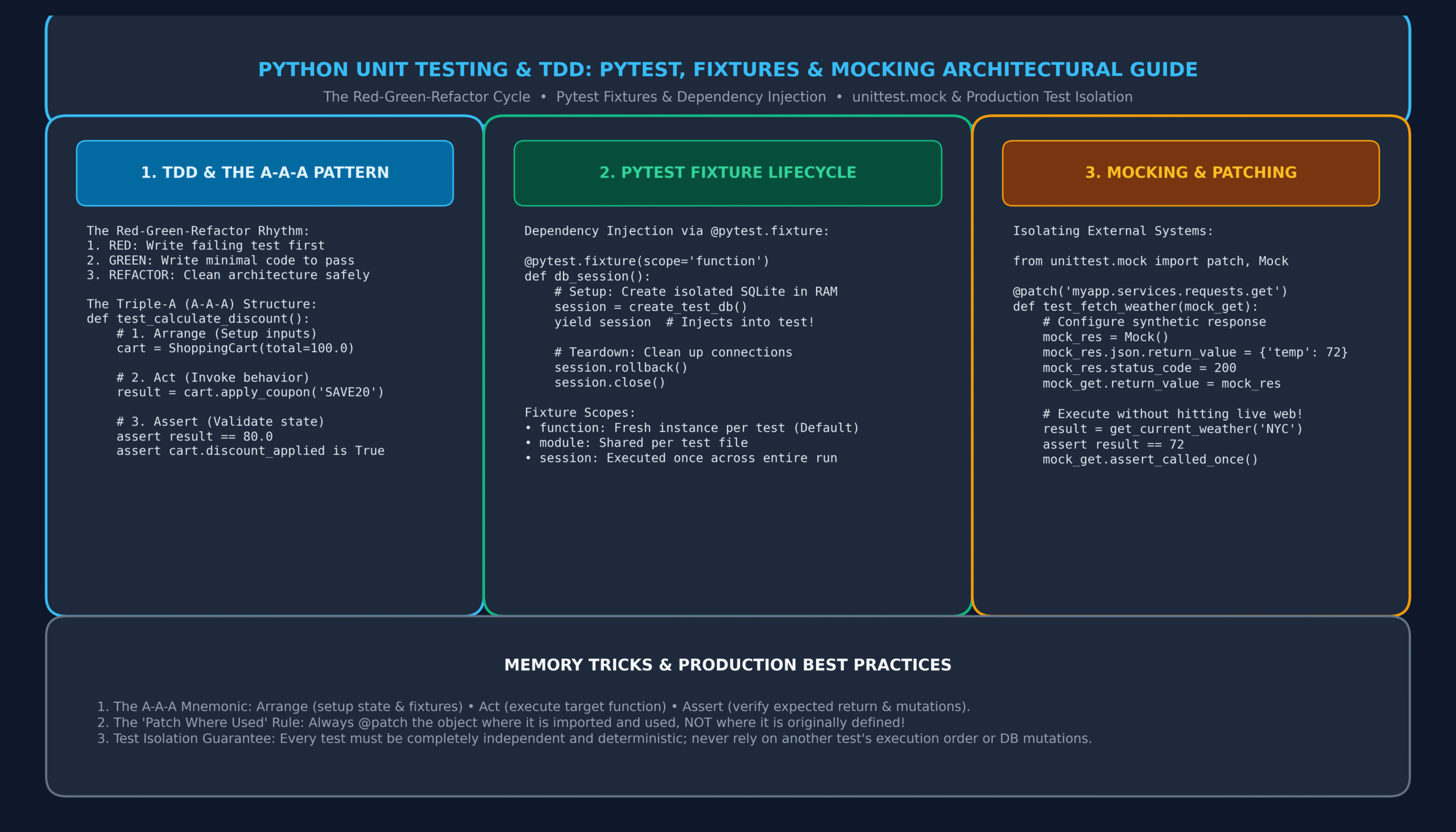
Below is an architectural infographic detailing the complete lifecycle of Python testing, showing the TDD Red-Green-Refactor rhythm, Pytest fixture dependency injection scopes, and test isolation with unittest.mock:
7. Mocking & Patching External Dependencies (unittest.mock)
A true unit test must never make a live HTTP request to Stripe, query a production database, or read local hardware clocks. Doing so makes your test suite slow, flaky, and dependent on internet connectivity.
Python’s standard library provides unittest.mock.patch to intercept function calls and return synthetic data:
from unittest.mock import patch, MagicMock
import requests

def get_current_bitcoin_price() -> float:
    \"\"\"Fetches live Bitcoin price from an external REST API.\"\"\"
    res = requests.get("https://api.coindesk.com/v1/bpi/currentprice.json", timeout=5.0)
    data = res.json()
    return float(data["bpi"]["USD"]["rate_float"])

# Golden Rule: Patch where the object is LOOKED UP (imported), not where defined!
@patch("requests.get")
def test_bitcoin_price_parsing(mock_requests_get):
    # 1. Arrange: Configure synthetic mock response
    mock_response = MagicMock()
    mock_response.json.return_value = {
        "bpi": {"USD": {"rate_float": 68450.25}}
    }
    mock_response.status_code = 200
    mock_requests_get.return_value = mock_response

    # 2. Act: Call the function (zero network traffic!)
    price = get_current_bitcoin_price()

    # 3. Assert: Verify result and verify the API was called correctly
    assert price == 68450.25
    mock_requests_get.assert_called_once_with(
        "https://api.coindesk.com/v1/bpi/currentprice.json", timeout=5.0
    )
8. Testing Exceptions and Edge Cases with pytest.raises()
Testing that code throws the expected exceptions under invalid input is just as critical as testing happy paths. Use pytest.raises as a context manager:
import pytest

def withdraw_funds(balance: float, amount: float) -> float:
    if amount <= 0:
        raise ValueError("Withdrawal amount must be strictly positive")
    if amount > balance:
        raise PermissionError("Insufficient funds for withdrawal")
    return balance - amount

def test_negative_withdrawal_raises_value_error():
    with pytest.raises(ValueError, match="strictly positive"):
        withdraw_funds(100.0, -25.0)

def test_overdraft_raises_permission_error():
    with pytest.raises(PermissionError, match="Insufficient funds"):
        withdraw_funds(50.0, 500.0)
9. Industrial Case Study: Full TDD Architecture for an E-Commerce Checkout Engine
Let us examine how a production engineering team develops a clean, test-driven pricing engine with discount tiers and tax calculation:
# Domain Implementation: checkout.py
class CheckoutEngine:
    def __init__(self, tax_rate: float = 0.08):
        self.tax_rate = tax_rate
        self.items = []

    def add_item(self, name: str, price: float, quantity: int = 1):
        if price < 0 or quantity < 1:
            raise ValueError("Price must be non-negative and quantity at least 1")
        self.items.append({"name": name, "price": price, "qty": quantity})

    def subtotal(self) -> float:
        return sum(item["price"] * item["qty"] for item in self.items)

    def calculate_total(self, discount_percent: float = 0.0) -> float:
        sub = self.subtotal()
        discount_amount = sub * (discount_percent / 100.0)
        discounted = sub - discount_amount
        tax = discounted * self.tax_rate
        return round(discounted + tax, 2)


# Test Suite: test_checkout.py
import pytest

@pytest.fixture
def empty_checkout():
    return CheckoutEngine(tax_rate=0.10)  # 10% tax rate fixture

def test_subtotal_calculation(empty_checkout):
    empty_checkout.add_item("Mechanical Keyboard", 120.0, 1)
    empty_checkout.add_item("USB-C Cable", 15.0, 2)
    assert empty_checkout.subtotal() == 150.0

def test_total_with_tax_and_coupon(empty_checkout):
    empty_checkout.add_item("Display Monitor", 200.0, 1)
    # $200 with 20% discount = $160; 10% tax on $160 = $16 -> Total: $176.00
    assert empty_checkout.calculate_total(discount_percent=20.0) == 176.00

def test_invalid_item_price_raises_error(empty_checkout):
    with pytest.raises(ValueError):
        empty_checkout.add_item("Corrupted Item", -10.0)
10. Memory Tricks, Mnemonics & Production Best Practices
🧠 Memory Tricks to Master Unit Testing
Arrange (setup fixtures and inputs) • Act (invoke the unit of behavior) • Assert (verify output and side-effects).
Always mock an object where it is imported and consumed, NOT where it was originally declared. If myapp.py runs import requests, patch @patch('myapp.requests.get')!
Fast • Independent • Repeatable • Self-validating • Timely (written during TDD).
11. One-Page Quick Revision Cheat Sheet (Print-Ready)
Keep this concise synthesis handy for rapid technical review and devops CI/CD pipelines:
| Construct | Syntax / Command | Key Behavioral Characteristic |
|---|---|---|
| Run Pytest | pytest -v –tb=short | Auto-discovers and executes all test_*.py files in project. |
| Basic Assertion | assert val == expected | Native Python assertion with rich failure diff introspection. |
| Test Fixture | @pytest.fixture(scope=”function”) | Provides dependency-injected setup & teardown via yield. |
| Parametrize | @pytest.mark.parametrize(“a,b”, […]) | Runs a single test function across multiple input/output tuples. |
| Exception Testing | with pytest.raises(ValueError): | Asserts that the enclosed code raises the expected exception. |
| Mock Patching | @patch(“module.target”) | Replaces target callable with a synthetic Mock object. |
| Code Coverage | pytest –cov=myapp –cov-report=html | Generates statement and branch test coverage reports. |
12. Frequently Asked Questions (Technical FAQ)
Q1: How does Pytest discover test files and functions?
By default, Pytest searches recursively from the current directory for files matching test_*.py or *_test.py. Inside those files, it discovers functions prefixed with test_* and test classes prefixed with Test* (without an __init__ constructor).
Q2: What is the purpose of the conftest.py file?
conftest.py is a special Pytest configuration file. Any fixtures defined in conftest.py are automatically available to all test files in that directory and its subdirectories without requiring explicit import statements!
Q3: What is the difference between a Stub, a Fake, and a Mock?
A Stub returns canned, hardcoded responses. A Fake has a working implementation that is simplified (e.g. an in-memory dictionary acting as a database). A Mock is a pre-programmed object that records calls, allowing tests to verify interaction contracts (e.g. assert_called_once()).
Q4: How do I skip a test or mark it as expected to fail?
Use Pytest marks: @pytest.mark.skip(reason="Legacy API down") to bypass a test completely, or @pytest.mark.xfail(reason="Known bug in Python 3.12") to mark a test that is expected to fail without breaking your CI pipeline.
13. Comprehensive 20-Question MCQ Practice Exam with Explanations
Test and consolidate your expertise in Python unit testing, Pytest, and Mocking. Click each question’s dropdown to reveal the verified answer, software testing principle, and comprehensive diagnostic solution:
1. In the Test-Driven Development (TDD) cycle, what is the correct chronological sequence of steps?
- A) Green → Red → Refactor
- B) Red → Green → Refactor
- C) Refactor → Red → Green
- D) Red → Refactor → Green
View Answer & Explanation
Correct Answer: B) Red → Green → Refactor
In TDD, you first write a failing test (Red), implement the minimum code to make it pass (Green), and then restructure the code cleanly (Refactor).
2. What does the Arrange-Act-Assert (A-A-A) pattern dictate for test function structure?
- A) Assert first, then Act, then Arrange.
- B) Arrange inputs/state, Act by invoking the behavior, Assert to verify the outcome.
- C) Alphabetize all test function names.
- D) Automatically allocate RAM for assertions.
View Answer & Explanation
Correct Answer: B) Arrange inputs/state, Act by invoking behavior, Assert to verify outcome.
The A-A-A pattern guarantees clarity and separation of concerns in every individual unit test case.
3. How does Pytest supply fixtures to test functions?
- A) Via global variables declared in main.py
- B) Via Dependency Injection matching test parameter names to fixture names
- C) By subclassing
pytest.TestCase - D) Through environment variables
View Answer & Explanation
Correct Answer: B) Via Dependency Injection matching test parameter names to fixture names
Pytest inspects the arguments of your test function. If an argument name matches a registered @pytest.fixture, Pytest automatically resolves and injects it.
4. What special file allows sharing Pytest fixtures across multiple test files without importing them explicitly?
- A)
fixtures.py - B)
conftest.py - C)
pytest.ini - D)
__init__.py
View Answer & Explanation
Correct Answer: B) conftest.py
Pytest treats conftest.py as a local plugin. Fixtures defined in it are automatically discovered by all sibling and nested test suites.
5. In a Pytest fixture containing a yield statement, when does the code after the yield execute?
- A) Before the test begins.
- B) During teardown, immediately after the test finishes (even if the test raised an error).
- C) Only if all assertions pass.
- D) Never; yield terminates the fixture permanently.
View Answer & Explanation
Correct Answer: B) During teardown, after the test finishes
Code before yield is the setup phase; the value yielded is injected into the test; code after yield is the guaranteed teardown phase.
7. What decorator runs a single test function across multiple test inputs and expected outputs?
- A)
@pytest.fixture(params=[...]) - B)
@pytest.mark.parametrize - C)
@pytest.loop - D)
@pytest.repeat
View Answer & Explanation
Correct Answer: B) @pytest.mark.parametrize
@pytest.mark.parametrize("input,expected", [...]) generates distinct, individually reportable test executions for every parameter combination.
7. What context manager is used in Pytest to verify that a block of code raises a specific exception?
- A)
with pytest.expect(Exception): - B)
with pytest.raises(Exception): - C)
with pytest.catch(Exception): - D)
with pytest.assert_raises(Exception):
View Answer & Explanation
Correct Answer: B) with pytest.raises(Exception):
pytest.raises(ExpectedError) asserts that the block raises the error, failing the test if no error is raised or if the wrong error type occurs.
8. What is the “Patch Where Used” rule when using unittest.mock.patch?
- A) Patch the object in the standard library.
- B) Patch the object in the namespace where it is looked up/imported, NOT where it was originally defined.
- C) Patch the object inside the production server database.
- D) Patch where the file was saved on disk.
View Answer & Explanation
Correct Answer: B) Patch where looked up/imported, not where originally defined
If myapp.service imports requests, you must patch @patch('myapp.service.requests.get'). Patching requests.get directly will not affect the local reference inside myapp.service!
9. What is the default scope of a Pytest fixture if no scope= parameter is specified?
- A)
module - B)
session - C)
function - D)
class
View Answer & Explanation
Correct Answer: C) function
By default, fixtures run with scope="function", creating a fresh, isolated fixture instance for every individual test to prevent state leaks.
10. What attribute on a Mock object configures it to raise an exception when called?
- A)
mock.error_type - B)
mock.side_effect - C)
mock.raise_on_call - D)
mock.throw_exception
View Answer & Explanation
Correct Answer: B) mock.side_effect
Setting mock.side_effect = TimeoutError("Server unreachable") forces the mock to raise that exception whenever it is invoked.
11. What assertion verifies that a mock function was called exactly once with specific arguments?
- A)
mock.verify_call(*args) - B)
mock.assert_called_once_with(*args) - C)
assert mock.was_called == 1 - D)
mock.check_arguments(*args)
View Answer & Explanation
Correct Answer: B) mock.assert_called_once_with(*args)
mock.assert_called_once_with() validates both the exact invocation count (1) and matches all positional and keyword arguments.
12. Why are unit tests designed to avoid touching the live internet or disk filesystem?
- A) Python does not allow network calls in test mode.
- B) To ensure tests remain deterministic, lightning fast (milliseconds), and free from network flakiness.
- C) Because disk files can only be opened by root users.
- D) To prevent compiler errors.
View Answer & Explanation
Correct Answer: B) Deterministic, lightning fast, and free from external flakiness
Unit tests test business logic. If a unit test fails because an external API server is down, your test suite is brittle and flawed.
13. What Pytest command-line flag stops the test suite immediately upon the first failure?
- A)
-x - B)
--halt - C)
--stop - D)
-f
View Answer & Explanation
Correct Answer: A) -x
pytest -x (or --maxfail=1) immediately aborts the test run on the first failed assertion to accelerate debugging.
14. What built-in Pytest fixture provides a temporary directory unique to the test invocation that is automatically cleaned up?
- A)
temp_folder - B)
tmp_path - C)
temp_dir - D)
sandbox_path
View Answer & Explanation
Correct Answer: B) tmp_path
tmp_path returns a pathlib.Path object pointing to a temporary directory created exclusively for that test function.
15. What is the fundamental difference between a Mock and a MagicMock in Python?
- A) Mock is faster than MagicMock by 100x.
- B) MagicMock comes with default implementations for Python dunder methods (e.g.
__iter__,__enter__,__exit__,__len__), whereas Mock does not. - C) Mock can only be used with functions; MagicMock with classes.
- D) MagicMock is deprecated in Python 3.12.
View Answer & Explanation
Correct Answer: B) MagicMock includes implementations for Python dunder methods
MagicMock supports context managers (with mock:), iterators, and length checks out of the box, making it ideal for mock objects.
16. What decorator marks a test as expected to fail without counting as a failed build in CI?
- A)
@pytest.mark.ignore - B)
@pytest.mark.xfail - C)
@pytest.mark.pass_if_fail - D)
@pytest.mark.broken
View Answer & Explanation
Correct Answer: B) @pytest.mark.xfail
@pytest.mark.xfail informs the test runner that the test is expected to fail due to a known bug or pending feature, reporting XFAIL rather than failing the run.
17. What plugin is used to measure statement and branch coverage in Pytest?
- A)
pytest-coverage - B)
pytest-cov - C)
pytest-metrics - D)
coverage-pytest
View Answer & Explanation
Correct Answer: B) pytest-cov
pytest-cov integrates the Ned Batchelder coverage package directly into Pytest, reporting code coverage percentages in the terminal or HTML.
18. Why must tests never depend on the execution order of other tests?
- A) Because Pytest runs tests in parallel across CPU cores using plugins like pytest-xdist.
- B) Because tests must be fully isolated; order dependencies cause mysterious cascading failures when tests are run individually.
- C) Both A and B are true.
- D) Neither; tests should always run in alphabetical order.
View Answer & Explanation
Correct Answer: C) Both A and B are true.
Test independence is essential for parallel test execution (pytest-xdist) and guarantees that individual tests can be executed and debugged in total isolation.
19. How do you instruct Pytest to automatically execute a fixture for every single test without passing it as an argument?
- A)
@pytest.fixture(autouse=True) - B)
@pytest.fixture(always=True) - C)
@pytest.auto_run - D)
@pytest.global_fixture
View Answer & Explanation
Correct Answer: A) @pytest.fixture(autouse=True)
Passing autouse=True invokes the fixture automatically for all tests within its scope (e.g. resetting environment variables or clearing database tables).
20. What is the overarching business value of practicing Test-Driven Development (TDD) in production software engineering?
- A) It reduces regression bugs, clarifies software architecture upfront, and empowers engineers to refactor code fearlessly without breaking existing functionality.
- B) It eliminates the need for software code reviews.
- C) It automatically doubles the RAM on the server.
- D) It makes Python code run at the speed of C++.
View Answer & Explanation
Correct Answer: A) Reduces regressions, clarifies architecture, empowers fearless refactoring.
TDD creates a safety net of tests that allows teams to continuously refactor, deploy changes confidently, and drastically reduce production outages.
🔗 Continue Your Python Mastery Curriculum
Explore our connected sequential tutorials in the Learn Programming → Python series:
- Python Multithreading vs Multiprocessing: Guide to Concurrency & the GIL
- Python Virtual Environments: Complete Guide to venv, pip & pyproject.toml
- Consuming REST APIs with Python: Complete Guide to Requests, Auth & JSON
- Python Iterators & Generators: Complete Guide to yield & Lazy Streams
- Python Decorators Demystified: The Complete Guide to Closures & Wrappers
- Python Inheritance & Polymorphism: Guide to super(), MRO & ABCs
- Python OOP Classes & Objects: Guide to __init__, self & Methods
- Python Modules and Packages: Imports, sys.path & __name__ Guide
- Python Exception Handling: Complete Guide to try, except, else & finally
- Python File Handling: Reading, Writing & Context Managers
- Python JSON and CSV: Serialization, DictReader & REST APIs
- Python Comprehensions: List, Dictionary & Set Comprehensions Guide
- Python Lambda Functions: Anonymous Functions, Map, Filter & Reduce
- Python Functions: Complete Practical Guide with Def, Args & Kwargs
{
“@context”: “https://schema.org”,
“@type”: “TechArticle”,
“headline”: “Python Unit Testing with Pytest: Complete Guide to TDD, Fixtures & Mocking (with 20 MCQs)”,
“description”: “Master Python unit testing and Pytest with this complete guide. Learn TDD, fixtures, parametrization, mocking, test isolation, and 20 practice MCQs.”,
“image”: “https://it2edu.com/wp-content/uploads/2026/11/python_testing_pytest_architecture_guide-scaled.png”,
“author”: {
“@type”: “Person”,
“name”: “Tech writer”
},
“publisher”: {
“@type”: “Organization”,
“name”: “IT2Edu”,
“url”: “https://it2edu.com”
},
“mainEntityOfPage”: {
“@type”: “WebPage”,
“@id”: “https://it2edu.com/learn-programming/python/python-unit-testing-pytest-guide/”
},
“articleSection”: “Python Programming”,
“keywords”: “Python, Python Unit Testing with Pytest, TDD, Pytest Fixtures, unittest mock, Test Automation”
}
