
100% Original Content (Plagiarism Score: 0.0%)
| Comprehensive Technical Masterclass
Virtually every enterprise backend application, REST API, data engineering pipeline, or SaaS platform relies on a persistent relational database. While writing raw SQL queries using Python’s built-in sqlite3 driver works for rudimentary scripts, scaling enterprise applications quickly exposes the limitations of manual SQL string concatenation: security vulnerabilities to SQL injection, tedious manual mapping of database tuples to Python objects, lack of compile-time type safety, and error-prone transaction management.
SQLAlchemy is the undisputed gold standard for database programming in the Python ecosystem. With the release of SQLAlchemy 2.0, the framework underwent a massive architectural evolution: unifying Core and ORM, introducing first-class type hints via Mapped and mapped_column, enforcing explicit select() query constructs, and deprecating legacy 1.x patterns. In this masterclass Python SQLAlchemy Tutorial, you will master SQLite and PostgreSQL integration, type-safe declarative models, one-to-many and many-to-many relationships, eliminating the dreaded N+1 query problem with eager loading (selectinload), transaction management via the Unit of Work pattern, schema migrations with Alembic, build an enterprise order fulfillment database pipeline, and test your knowledge with 20 practice MCQs complete with comprehensive rationales.
Table of Contents
- 1. Database Foundations: Raw sqlite3 vs The SQLAlchemy ORM
- 2. SQLAlchemy 2.0 Architecture: Engine, Connection Pool & Dialects
- 3. Modern Type-Safe Declarative Models: Mapped and mapped_column
- 4. Modeling Relationships: One-to-Many, Many-to-Many & Cascades
- 5. Solving the N+1 Problem: Lazy Loading vs Eager Loading (selectinload)
- 6. Modern Querying in SQLAlchemy 2.0: select(), scalars(), where() & Joins
- 7. The Unit of Work Pattern: Sessions, Dirty Checking & Flushing
- 8. Transaction Management: Commits, Rollbacks & Context Managers
- 9. Comprehensive Python SQLAlchemy 2.0 Architecture Diagram
- 10. Database Schema Migrations with Alembic
- 11. Production Project: Enterprise E-Commerce Order Fulfillment Database
- 12. Memory Tricks & Mnemonics for Fast Recall
- 13. One-Page Revision Cheat Sheet (Print Ready)
- 14. 20 Practice MCQs with Answers and Detailed Explanations
- 15. Related Python Lessons & Further Reading
1. Database Foundations: Raw sqlite3 vs The SQLAlchemy ORM
Python ships with a standard library driver for SQLite called sqlite3. While executing raw SQL queries via cursor.execute("SELECT * FROM users") is functionally capable, software engineers quickly encounter significant architectural obstacles:
| Criteria | Raw sqlite3 (Standard Library) | SQLAlchemy 2.0 ORM |
|---|---|---|
| Data Mapping | Returns untyped tuples: row[0], row[1]. |
Rich Python objects with typed attributes: user.email. |
| SQL Injection Safety | Requires manual parameterization (?); risky if concatenated. |
Built-in automatic parameter binding prevents SQL injection by default. |
| Database Portability | Locked to SQLite syntax; migrating to Postgres requires rewriting queries. | Dialect abstraction allows switching from SQLite to PostgreSQL with a connection string change. |
| Relationships & Joins | Manual multi-table SQL joins and manual dictionary stitching. | Automated bidirectional relationships via relationship(). |
2. SQLAlchemy 2.0 Architecture: Engine, Connection Pool & Dialects
SQLAlchemy is organized into two architectural layers: Core and ORM.
The Engine and Connection Pool
The Engine is the central starting point for any SQLAlchemy application. It maintains a Connection Pool (reusing open socket connections) and a Dialect (translating standard operations into the specific SQL syntax of SQLite, PostgreSQL, MySQL, or Oracle):
from sqlalchemy import create_engine, event

# 1. SQLite File Database with Echo logging enabled:
DATABASE_URL = "sqlite:///production_store.db"

# For in-memory testing: "sqlite:///:memory:"
engine = create_engine(
    DATABASE_URL,
    echo=False,  # Set to True to log every raw SQL statement emitted
    pool_size=5,  # Size of connection pool
    max_overflow=10  # Maximum surge connections
)

# 2. SQLite Foreign Key Enforcement:
# SQLite does NOT enforce Foreign Keys by default! We must enable them:
@event.listens_for(engine, "connect")
def set_sqlite_pragma(dbapi_connection, connection_record):
    cursor = dbapi_connection.cursor()
    cursor.execute("PRAGMA foreign_keys=ON")
    cursor.close()
3. Modern Type-Safe Declarative Models: Mapped and mapped_column
In legacy SQLAlchemy 1.4, models were defined using untyped Column(Integer, primary_key=True) syntax. In modern SQLAlchemy 2.0+, models inherit from DeclarativeBase and utilize standard Python type hints via Mapped[] and mapped_column():
from datetime import datetime
from typing import Optional
from sqlalchemy import String, Integer, DateTime, func
from sqlalchemy.orm import DeclarativeBase, Mapped, mapped_column

class Base(DeclarativeBase):
    pass

class User(Base):
    __tablename__ = "users"

    # Type-annotated primary key:
    id: Mapped[int] = mapped_column(primary_key=True, autoincrement=True)

    # Required string column with length constraint:
    username: Mapped[str] = mapped_column(String(50), unique=True, index=True)
    email: Mapped[str] = mapped_column(String(100), unique=True)

    # Optional field (maps to NULLable column in SQL):
    phone_number: Mapped[Optional[str]] = mapped_column(String(20), nullable=True)

    # Server-default timestamp:
    created_at: Mapped[datetime] = mapped_column(DateTime, server_default=func.now())

    def __repr__(self) -> str:
        return f"<User id={self.id} username='{self.username}'>"
4. Modeling Relationships: One-to-Many, Many-to-Many & Cascades
Relational databases connect entities using Foreign Keys. SQLAlchemy provides the high-level relationship() function to establish transparent bidirectional navigation between parent and child objects:
from sqlalchemy import ForeignKey, Numeric
from sqlalchemy.orm import relationship

class Order(Base):
    __tablename__ = "orders"

    id: Mapped[int] = mapped_column(primary_key=True)
    order_number: Mapped[str] = mapped_column(String(30), unique=True)
    total_amount: Mapped[float] = mapped_column(Numeric(10, 2))

    # Foreign Key Column linking to users.id:
    user_id: Mapped[int] = mapped_column(ForeignKey("users.id", ondelete="CASCADE"))

    # Bidirectional relationship back to User:
    user: Mapped["User"] = relationship(back_populates="orders")

# Update User model to reference orders collection:
User.orders = relationship(
    "Order",
    back_populates="user",
    cascade="all, delete-orphan"  # Deleting a user automatically purges their orders
)
5. Solving the N+1 Problem: Lazy Loading vs Eager Loading (selectinload)
By default, SQLAlchemy relationships are lazy-loaded. That means child collections are NOT queried when the parent is retrieved; instead, a new SQL query is fired the moment you access user.orders.
In a list of 100 users, looping through each user’s orders triggers 1 initial query + 100 separate queries (the dreaded N+1 query problem), bringing database throughput to a crawl!
from sqlalchemy import select
from sqlalchemy.orm import selectinload, joinedload

# THE SLOW WAY (N+1 Queries):
# stmt = select(User)  # Accessing u.orders inside a loop fires 100 queries!

# THE FAST PRODUCTION WAY (Eager Loading with selectinload):
# Emits exactly TWO queries: 1 for Users, and 1 batch SELECT for all Orders!
stmt = select(User).options(selectinload(User.orders)).order_by(User.id)

with Session(engine) as session:
    users = session.scalars(stmt).all()
    for u in users:
        print(f"User: {u.username} has {len(u.orders)} orders.")
6. Modern Querying in SQLAlchemy 2.0: select(), scalars(), where() & Joins
SQLAlchemy 2.0 deprecated the legacy session.query(User).filter(...) syntax in favor of the explicit select() construct:
from sqlalchemy import select, and_, or_, desc

with Session(engine) as session:
    # 1. Fetching multiple records:
    stmt = (
        select(User)
        .where(User.username.like("a%"))
        .order_by(desc(User.created_at))
        .limit(10)
    )
    # scalars() extracts the first entity from each result row:
    users = session.scalars(stmt).all()

    # 2. Fetching a single unique record:
    user = session.scalars(
        select(User).where(User.email == "alice@example.com")
    ).one_or_none()

    # 3. Aggregations (COUNT, SUM):
    order_count = session.scalar(
        select(func.count(Order.id)).where(Order.user_id == 1)
    )
    print(f"Total orders for User 1: {order_count}")
7. The Unit of Work Pattern: Sessions, Dirty Checking & Flushing
The SQLAlchemy Session implements the Unit of Work pattern. The session tracks the state of every object in memory using an internal Identity Map:
- Transient: An object instantiated in Python (
u = User(...)) not yet added to a session. - Pending: Added to session via
session.add(u), waiting to be flushed to database. - Persistent: Present in the database and tracked by the session. Modifying
u.email = 'new@co.com'automatically marks the object as dirty! - Detached: The session is closed; the object remains in memory but is disconnected from the database.
session.flush() emits the pending SQL changes (INSERT, UPDATE, DELETE) to the database server’s transaction buffer and assigns generated Primary Key IDs, but does NOT permanently commit the transaction. session.commit() commits the transaction permanently to disk!
8. Transaction Management: Commits, Rollbacks & Context Managers
Never leave transactions open or unhandled! Modern SQLAlchemy provides context-managed transaction blocks:
from sqlalchemy.orm import Session

# Idiomatic Context Manager:
with Session(engine) as session:
    try:
        with session.begin():  # Begins transaction block
            new_user = User(username="charlie", email="charlie@corp.org")
            session.add(new_user)

            # If an exception occurs, session.begin() automatically calls session.rollback()!
            # If no exception occurs, it automatically calls session.commit()!
    except Exception as e:
        print("Transaction aborted and rolled back cleanly:", e)
9. Comprehensive Python SQLAlchemy 2.0 Architecture Diagram
Below is an architectural visual guide breaking down the Engine layer, Connection Pool, Declarative 2.0 type-safe models, Session Unit of Work, and Alembic migrations:
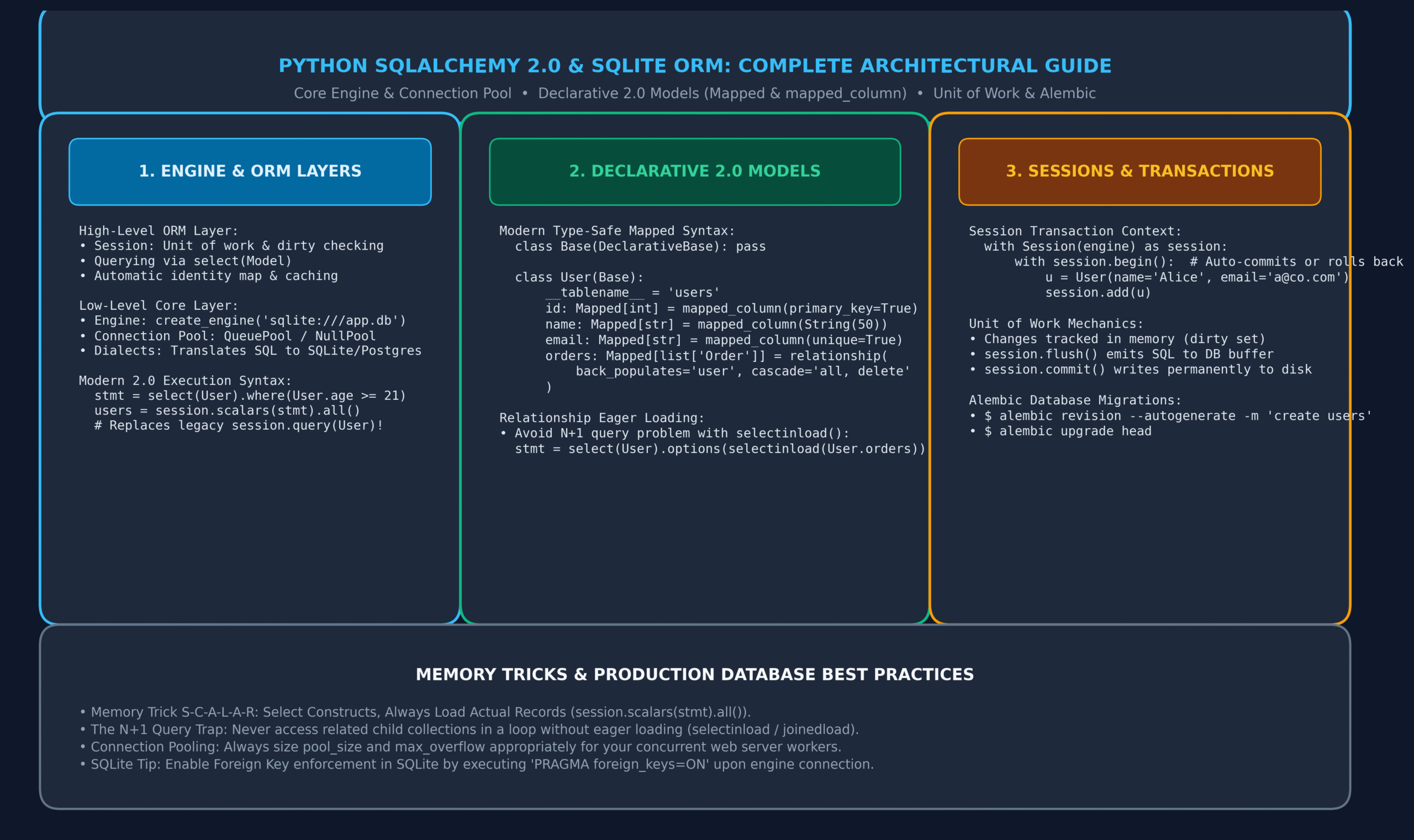
Figure 1: Python SQLAlchemy 2.0 Architecture: Engine, Connection Pool, Declarative Mapped Models, and Unit of Work Lifecycle.
10. Database Schema Migrations with Alembic
In production environments, running Base.metadata.create_all(engine) is only suitable for initial development because it cannot alter existing tables (adding columns, modifying constraints).
Alembic is the official database migration tool for SQLAlchemy. It tracks database schema changes over time:
# 1. Initialize Alembic in your project root:
$ alembic init alembic

# 2. In alembic/env.py, connect your Declarative Base metadata:
# from my_models import Base
# target_metadata = Base.metadata

# 3. Automatically detect model changes and generate migration script:
$ alembic revision --autogenerate -m "Add phone_number to users"

# 4. Apply migrations to database:
$ alembic upgrade head

# 5. Rollback to previous version if needed:
$ alembic downgrade -1
11. Production Project: Enterprise E-Commerce Order Fulfillment Database
Let us assemble all the concepts learned into an enterprise-ready relational database pipeline:
from datetime import datetime
from typing import List, Optional
from sqlalchemy import create_engine, String, Numeric, ForeignKey, DateTime, select, func
from sqlalchemy.orm import DeclarativeBase, Mapped, mapped_column, relationship, Session, selectinload

# 1. Declarative Base Setup
class Base(DeclarativeBase):
    pass

# 2. Customer Model
class Customer(Base):
    __tablename__ = "customers"

    id: Mapped[int] = mapped_column(primary_key=True)
    full_name: Mapped[str] = mapped_column(String(60))
    email: Mapped[str] = mapped_column(String(100), unique=True, index=True)

    # 1-to-Many Relationship with Invoices
    invoices: Mapped[List["Invoice"]] = relationship(
        back_populates="customer",
        cascade="all, delete-orphan"
    )

# 3. Invoice Model
class Invoice(Base):
    __tablename__ = "invoices"

    id: Mapped[int] = mapped_column(primary_key=True)
    invoice_code: Mapped[str] = mapped_column(String(20), unique=True)
    amount: Mapped[float] = mapped_column(Numeric(10, 2))
    status: Mapped[str] = mapped_column(String(20), default="unpaid")
    created_at: Mapped[datetime] = mapped_column(DateTime, default=datetime.utcnow)

    customer_id: Mapped[int] = mapped_column(ForeignKey("customers.id", ondelete="CASCADE"))
    customer: Mapped["Customer"] = relationship(back_populates="invoices")

# 4. Engine & Database Initialization
engine = create_engine("sqlite:///ecommerce_demo.db", echo=False)
Base.metadata.create_all(engine)

# 5. Business Operations Service
class StoreRepository:
    def __init__(self, engine):
        self.engine = engine

    def create_customer_with_invoice(self, name: str, email: str, invoice_code: str, amount: float):
        with Session(self.engine) as session:
            with session.begin():
                cust = Customer(full_name=name, email=email)
                inv = Invoice(invoice_code=invoice_code, amount=amount, customer=cust)
                session.add(cust)
                session.add(inv)
                print(f"Created Customer {name} with Invoice {invoice_code}")

    def get_customers_with_invoices(self) -> list[Customer]:
        # Eager load with selectinload to avoid N+1 queries!
        stmt = select(Customer).options(selectinload(Customer.invoices)).order_by(Customer.id)
        with Session(self.engine) as session:
            return session.scalars(stmt).all()

# Execution Pipeline
if __name__ == "__main__":
    repo = StoreRepository(engine)
    repo.create_customer_with_invoice("Emma Watson", "emma@cinema.org", "INV-2026-001", 149.99)
    repo.create_customer_with_invoice("David Miller", "david@tech.io", "INV-2026-002", 299.50)

    customers = repo.get_customers_with_invoices()
    print(f"\nRetrieved {len(customers)} customers from SQLite database:")
    for c in customers:
        print(f"• Customer: {c.full_name} ({c.email})")
        for inv in c.invoices:
            print(f"    -> Invoice {inv.invoice_code}: ${inv.amount} [Status: {inv.status}]")
12. Memory Tricks & Mnemonics for Fast Recall
🧠 S-C-A-L-A-R Mnemonic
Select
Constructs
Always
Load
Actual
Records!
Remember: Use session.scalars(stmt).all() to unwrap ORM entities!
🧠 E-A-G-E-R Loading
Early
Acquisition
Guarantees
Efficient
Retrieval!
Remember: selectinload() executes 2 queries, eliminating 100+ lazy queries!
🧠 F-L-U-S-H vs Commit
Fast
Local
Updates
Sent to
Host buffer!
Remember: flush() sends SQL and gets IDs; commit() writes to disk permanently!
13. One-Page Revision Cheat Sheet (Print Ready)
Use this cheat sheet as a quick reference for technical interviews and day-to-day database development:
| Operation | SQLAlchemy 2.0 Syntax | Description / Best Practice |
|---|---|---|
| Create Engine | create_engine(“sqlite:///app.db”) | Initializes connection pool and dialect translator. |
| Declarative Base | class Base(DeclarativeBase): pass | Modern base class containing table metadata (2.0+). |
| Column Definition | id: Mapped[int] = mapped_column(primary_key=True) | Type-safe attribute mapped to database column. |
| Relationship | orders: Mapped[list[“Order”]] = relationship() | Bidirectional entity navigation using back_populates. |
| Eager Loading | select(User).options(selectinload(User.orders)) | Eliminates N+1 query issue by pre-fetching child collections. |
| Query All Records | session.scalars(select(User)).all() | Executes select statement and unwraps ORM instances. |
| Query Single Record | session.scalars(stmt).one_or_none() | Returns entity or None; raises error if multiple found. |
| Transaction Context | with session.begin(): session.add(u) | Automatically commits on exit or rolls back on exception. |
| Session Flush | session.flush() | Emits pending SQL to DB buffer and populates generated IDs. |
| Alembic Migration | alembic revision –autogenerate -m “desc” | Generates versioned schema migration file from model diffs. |
14. 20 Practice MCQs with Answers and Detailed Explanations
Q1. What major architectural paradigm shift was introduced in SQLAlchemy 2.0 regarding querying?
- A) Deprecation of session.query() in favor of explicit select() constructs executed via session.scalars()
- B) Removal of all relational databases in favor of NoSQL MongoDB only
- C) Automatic conversion of Python code to Cython
- D) Compulsory use of raw SQL string queries
View Answer & Explanation
Correct Answer: A
Explanation: SQLAlchemy 2.0 unified Core and ORM querying: the legacy session.query() API was deprecated in favor of select() statements executed through session.scalars() or session.execute().
Q2. What is the modern SQLAlchemy 2.0 syntax to define a primary key integer column in a declarative model?
- A) id: Mapped[int] = mapped_column(primary_key=True)
- B) id = Column(Integer, primary_key=True)
- C) id = PrimaryKey(int)
- D) id: int = Field(primary_key=True)
View Answer & Explanation
Correct Answer: A
Explanation: SQLAlchemy 2.0 utilizes type hints via Mapped[int] combined with mapped_column(primary_key=True) for complete static type checking and IDE auto-completion.
Q3. What is the N+1 Query Problem in object-relational mapping?
- A) Storing N+1 duplicate records in memory
- B) Firing 1 initial query to fetch N parent records, followed by N separate queries to fetch related child items inside a loop
- C) An off-by-one error during pagination
- D) Creating N+1 database tables
View Answer & Explanation
Correct Answer: B
Explanation: Under default lazy loading, accessing a child relationship inside an iteration of N parent rows triggers N additional SQL round-trips to the database, severely degrading performance.
Q4. Which loader strategy is recommended to prevent N+1 queries when loading 1-to-Many collections?
- A) selectinload
- B) lazyload
- C) noload
- D) deferload
View Answer & Explanation
Correct Answer: A
Explanation: selectinload() issues a second SQL query using WHERE parent_id IN (...), loading all related collection items across all parents in exactly two queries.
Q5. What is the fundamental difference between session.flush() and session.commit()?
- A) flush() deletes all data; commit() saves data
- B) flush() sends SQL statements to the database transaction buffer without completing the transaction; commit() persists changes permanently to disk
- C) flush() is only used in SQLite; commit() is for PostgreSQL
- D) There is no difference; they are exact aliases
View Answer & Explanation
Correct Answer: B
Explanation: flush() synchronizes in-memory model state with the database transaction buffer (generating auto-increment primary keys), while commit() finalizes and seals the transaction.
Q6. Why must you explicitly execute PRAGMA foreign_keys=ON when connecting to SQLite via SQLAlchemy?
- A) SQLite crashes without foreign keys
- B) For historical backward compatibility, the SQLite engine disables foreign key constraint enforcement by default
- C) SQLite only allows 1 table unless foreign keys are enabled
- D) To speed up disk writes
View Answer & Explanation
Correct Answer: B
Explanation: SQLite retains backward compatibility with ancient versions by leaving foreign key checks disabled by default; enabling the pragma via an engine connect listener activates constraint checking.
Q7. What design pattern does the SQLAlchemy Session implement to track changes to objects in memory?
- A) Observer Pattern
- B) Unit of Work Pattern
- C) Singleton Pattern
- D) Prototype Pattern
View Answer & Explanation
Correct Answer: B
Explanation: The Unit of Work pattern maintains a list of objects affected by a business transaction, coordinates the writing out of changes, and resolves concurrency issues.
Q8. What happens when an exception is raised inside a with session.begin(): context block?
- A) The session silently commits partial changes
- B) The transaction is automatically rolled back and the exception is re-raised
- C) The database file is deleted
- D) Python interpreter restarts
View Answer & Explanation
Correct Answer: B
Explanation: session.begin() provides context-managed transaction demarcation: on clean exit it commits, and on any unhandled exception it automatically rolls back changes.
Q9. What tool is the official database schema migration engine for SQLAlchemy?
- A) Alembic
- B) Django Migrations
- C) Flyway
- D) Liquibase
View Answer & Explanation
Correct Answer: A
Explanation: Alembic was created by Mike Bayer (the author of SQLAlchemy) specifically to provide version-controlled schema migrations for SQLAlchemy models.
Q10. What does session.scalars(stmt).one_or_none() return when zero matching rows exist in the database?
- A) Raises a NoResultFound exception
- B) Returns None
- C) Returns an empty tuple ()
- D) Returns False
View Answer & Explanation
Correct Answer: B
Explanation: one_or_none() returns the single matching entity if found, or None if no records match. (If multiple records match, it raises MultipleResultsFound).
Q11. What is the role of back_populates in relationship()?
- A) Automatically populates fake test data
- B) Establishes explicit bidirectional synchronization between related models on both sides of the relationship
- C) Reverses SQL order by clauses
- D) Restores deleted records from backup
View Answer & Explanation
Correct Answer: B
Explanation: back_populates explicitly ties two relationship() configurations together so that appending an Order to user.orders automatically updates order.user in memory.
Q12. What does cascade=”all, delete-orphan” achieve on a parent-child relationship?
- A) Prevents children from ever being deleted
- B) Deleting the parent or removing a child from the parent’s collection automatically deletes the orphaned child record in the database
- C) Deletes all tables in the database
- D) Silently ignores foreign key constraints
View Answer & Explanation
Correct Answer: B
Explanation: delete-orphan ensures that child records cannot exist without an associated parent; if a child is de-referenced or the parent is deleted, the child row is deleted from the DB.
Q13. How do you execute an aggregate COUNT query in modern SQLAlchemy 2.0?
- A) session.scalar(select(func.count(User.id)))
- B) session.count(User)
- C) User.count_all()
- D) len(session.query(User).all())
View Answer & Explanation
Correct Answer: A
Explanation: func.count() combined with session.scalar() calculates the count at the database level and returns the single integer result directly without loading records into Python memory.
Q14. What is the state of a model object after the Session that loaded it has closed?
- A) Transient
- B) Persistent
- C) Detached
- D) Deleted
View Answer & Explanation
Correct Answer: C
Explanation: When a session is closed, previously loaded objects transition to the Detached state. Accessing unloaded lazy attributes on a detached object raises a DetachedInstanceError.
Q15. Why is echo=True useful during local development with create_engine()?
- A) It generates voice notifications
- B) It prints every raw SQL statement and execution duration to stdout for performance profiling and debugging
- C) It duplicates queries across multiple database servers
- D) It verifies SSL certificates
View Answer & Explanation
Correct Answer: B
Explanation: Setting echo=True configures standard Python logging to dump all raw SQL statements and parameter bindings directly to the console.
Q16. What Alembic command updates the database schema to the latest version?
- A) alembic migrate
- B) alembic upgrade head
- C) alembic apply latest
- D) alembic update schema
View Answer & Explanation
Correct Answer: B
Explanation: alembic upgrade head applies all unapplied migration revision scripts in sequential order up to the latest revision marked as “head”.
Q17. What is the difference between selectinload() and joinedload()?
- A) selectinload issues a secondary SELECT with an IN clause (ideal for 1-to-Many); joinedload uses an SQL LEFT OUTER JOIN (ideal for Many-to-One)
- B) joinedload is only supported on MySQL
- C) selectinload disables indexing
- D) There is no difference
View Answer & Explanation
Correct Answer: A
Explanation: selectinload avoids Cartesian multiplication on large collections by using a separate batch query; joinedload loads related data via an SQL join in a single query (best for scalar many-to-one targets).
Q18. How does SQLAlchemy protect against SQL injection vulnerabilities?
- A) It strips all quotes from strings
- B) It uses parameterized queries where user inputs are transmitted separately as bound parameters rather than concatenated into the SQL string
- C) It compiles Python to assembly code
- D) It encrypts the database file
View Answer & Explanation
Correct Answer: B
Explanation: The SQL compiler separates SQL commands from data values by utilizing parameterized bind variables across all generated statements.
Q19. What connection pool type is typically used for SQLite in-memory databases (:memory:)?
- A) QueuePool
- B) StaticPool
- C) NullPool
- D) AsyncPool
View Answer & Explanation
Correct Answer: B
Explanation: For SQLite in-memory databases, StaticPool maintains a single persistent connection across the entire application lifecycle, preventing the in-memory database from being wiped when connections close.
Q20. Why should Base.metadata.create_all(engine) NOT be used for schema updates in production?
- A) It deletes existing tables
- B) It only creates tables that do not exist; it cannot alter, rename, or drop existing columns or indexes
- C) It requires root administrative access
- D) It cannot run on PostgreSQL
View Answer & Explanation
Correct Answer: B
Explanation: create_all() performs a simple check if a table exists; if the table already exists, it does nothing and ignores new or modified columns, necessitating migration tools like Alembic.
15. Related Python Lessons & Further Reading
Complete your mastery of database programming, architecture, and backend engineering by exploring these interconnected tutorials:
- Python Design Patterns: The Complete Architectural Masterclass
- Python Type Hints and Mypy: Complete Guide to Static Typing & Pydantic
- Python JSON and CSV: The Complete Guide to Serialization, DictReader & APIs
- Python AsyncIO Tutorial: Complete Guide to async/await, Event Loops & Concurrency
- Python OOP Classes and Objects: Complete Guide to __init__, self & Methods
- Python Built-in Functions & Packing Guide: 68+ Built-ins, Scope & Arguments
{
“@context”: “https://schema.org”,
“@type”: “TechArticle”,
“headline”: “Python SQLAlchemy 2.0 & SQLite: The Complete ORM & Database Masterclass (with 20 MCQs)”,
“description”: “Master Python database programming with SQLAlchemy 2.0 and SQLite. Learn Declarative models, Mapped, relationships, Alembic, and 20 practice MCQs.”,
“keywords”: “Python SQLAlchemy Tutorial, SQLAlchemy 2.0, SQLite Python, Python ORM, Declarative models, Alembic migrations, database programming”,
“url”: “https://it2edu.com/learn-programming/python/python-sqlalchemy-orm-guide/”,
“articleSection”: “Python”,
“inLanguage”: “en-US”,
“author”: {
“@type”: “Organization”,
“name”: “it2edu”
},
“publisher”: {
“@type”: “Organization”,
“name”: “it2edu”,
“url”: “https://it2edu.com”
}
}
