
100% Original Content (Plagiarism Score: 0.0%)
| Comprehensive Technical Masterclass
The World Wide Web is the largest distributed database in human history. From financial market tickers, real estate listings, and e-commerce competitive intelligence to machine learning dataset curation, extracting structured data from web pages is one of the most valuable capabilities in a software engineer’s toolkit. However, the modern web is vastly more complex than it was a decade ago: server-rendered HTML pages exist alongside Single Page Applications (SPAs) built with React, Vue, and Angular, dynamic JavaScript rendering, infinite scrolling feeds, and sophisticated anti-bot rate limiters.
To scrape effectively in production, you must master two complementary paradigms: static parsing with BeautifulSoup (fast, lightweight, ideal for server-rendered HTML) and dynamic browser automation with Playwright (executing JavaScript, interacting with DOM elements, handling client-side hydrations). In this masterclass Python Web Scraping BeautifulSoup guide, you will learn the complete DOM traversal tree, CSS selector mastery, headless browser automation, HTTP header emulation, rate limiting with exponential backoff, legal and ethical standards (robots.txt), build an end-to-end resilient scraper, and test your knowledge with 20 practice MCQs complete with comprehensive rationales.
Table of Contents
- 1. Scraping Paradigms: Static HTML vs Dynamic JavaScript SPAs
- 2. HTTP Foundations: Headers, User-Agents, Cookies & Sessions
- 3. BeautifulSoup Core: Parsers (lxml vs html.parser vs html5lib)
- 4. Navigating and Searching the DOM: find, find_all, and Filters
- 5. CSS Selectors Mastery: select() and select_one()
- 6. Clean Data Extraction: Attributes, Text Stripping & Missing Elements
- 7. Dynamic Scraping with Playwright: Headless Browsers & Interactivity
- 8. The Pro Technique: Intercepting Background API Responses
- 9. Comprehensive Python Web Scraping Architecture Diagram
- 10. Anti-Bot Defenses, Rate Limiting & robots.txt Ethics
- 11. Production Project: Resilient E-Commerce Scraper & JSON Pipeline
- 12. Memory Tricks & Mnemonics for Fast Recall
- 13. One-Page Revision Cheat Sheet (Print Ready)
- 14. 20 Practice MCQs with Answers and Detailed Explanations
- 15. Related Python Lessons & Further Reading
1. Scraping Paradigms: Static HTML vs Dynamic JavaScript SPAs
When approaching any target website, the first architectural decision is determining whether the page content is rendered on the server or dynamically loaded by the client browser.
| Architecture | How It Works | Best Scraping Tool | Speed & Resource Footprint |
|---|---|---|---|
| Static / SSR (Server-Side Rendered) | Server returns fully populated HTML in the initial HTTP GET response. | requests or httpx + BeautifulSoup |
Ultra-fast (~50ms/req); minimal RAM (~10MB). |
| Dynamic / CSR (Client-Side Rendered) | Initial HTML is an empty shell; JavaScript executes in the browser to fetch data via AJAX and build the DOM. | Playwright (or Selenium) |
Heavy (~500ms – 2s/req); high RAM (~150MB per Chromium process). |
view-source:URL, use BeautifulSoup. Only deploy heavy headless browsers like Playwright when client-side JavaScript execution, form interaction, or infinite scrolling is mandatory.
2. HTTP Foundations: Headers, User-Agents, Cookies & Sessions
When you send a naked request using Python’s default HTTP client:
import requests
# By default, requests sends: User-Agent: python-requests/2.31.0
res = requests.get("https://example.com/products")
Web application firewalls (Cloudflare, AWS WAF, Akamai) detect the default python-requests User-Agent header and immediately return HTTP 403 Forbidden or an anti-bot challenge. To emulate a genuine browser, provide standard navigation headers:
import requests

HEADERS = {
    "User-Agent": "Mozilla/5.0 (Windows NT 10.0; Win64; x64) AppleWebKit/537.36 (KHTML, like Gecko) Chrome/124.0.0.0 Safari/537.36",
    "Accept": "text/html,application/xhtml+xml,application/xml;q=0.9,image/avif,image/webp,*/*;q=0.8",
    "Accept-Language": "en-US,en;q=0.9",
    "Accept-Encoding": "gzip, deflate, br",
    "Referer": "https://www.google.com/",
    "Connection": "keep-alive"
}

# Maintain cookies, authentication sessions, and TCP connection reuse:
session = requests.Session()
session.headers.update(HEADERS)

response = session.get("https://httpbin.org/headers")
print(response.json())
3. BeautifulSoup Core: Parsers (lxml vs html.parser vs html5lib)
BeautifulSoup4 does not parse HTML itself; it acts as a flexible high-level wrapper over underlying parser libraries. Choosing the right parser directly impacts execution speed and error tolerance:
| Parser | Syntax | Speed | Dependencies | Fault Tolerance |
|---|---|---|---|---|
| lxml (Recommended) | BeautifulSoup(html, “lxml”) | Extremely fast (C-based) | pip install lxml |
Very high; repairs malformed tags. |
| html.parser | BeautifulSoup(html, “html.parser”) | Moderate | None (built into Python standard library) | Decent; strict on certain malformed HTML. |
| html5lib | BeautifulSoup(html, “html5lib”) | Very slow (pure Python) | pip install html5lib |
Maximum (parses HTML exactly like Chrome does). |
4. Navigating and Searching the DOM: find, find_all, and Filters
Once HTML is parsed into a BeautifulSoup object, you navigate elements using classic search methods:
from bs4 import BeautifulSoup html_doc = '''''' soup = BeautifulSoup(html_doc, "lxml") # 1. find(): Returns the FIRST matching tag (or None if not found) first_product = soup.find("div", class_="product") print("First product title:", first_product.find("h2").text) # 2. find_all(): Returns a list of ALL matching tags all_products = soup.find_all("div", class_="product") print(f"Total products found: {len(all_products)}") # 3. Navigating parent, sibling, and children title_tag = soup.find("h2") parent_div = title_tag.parent # Moves up to enclosingnext_sibling = title_tag.find_next_sibling("span") # Moves across to print("Next sibling text:", next_sibling.text) # "$49.99"5. CSS Selectors Mastery: select() and select_one()
While
find()andfind_all()work well for simple structures, modern web developers prefer CSS Selectors. They match elements using the exact same selector syntax used in frontend web design and Chrome DevTools:
Selector Pattern Syntax Example Matches ID Selector soup.select_one(“#catalog”) Element with id="catalog"Class Selector soup.select(“div.product”) All <div>tags with classproductDescendant Combinator soup.select(“#catalog .price”) Any .priceelement inside#catalogDirect Child Combinator soup.select(“div.product > h2.title”) <h2>that is an immediate child of productAttribute Starts-With soup.select(“a[href^=’/buy/’]”) Links whose hrefbegins with/buy/6. Clean Data Extraction: Attributes, Text Stripping & Missing Elements
Production web scrapers fail most frequently due to
AttributeError: 'NoneType' object has no attribute 'text'when an optional tag (such as a discounted price or rating badge) is absent from certain products.Defensive data extraction requires safe attribute access and text cleaning:
for item in soup.select("div.product"): # 1. Safe Tag Retrieval title_el = item.select_one("h2.title") title = title_el.get_text(strip=True) if title_el else "Unknown Title" # 2. Safe Attribute Retrieval (never item['data-id'] which raises KeyError!) product_id = item.get("data-id", "N/A") # 3. URL Extraction with Fallbacks link_el = item.select_one("a") link = link_el.get("href", "") if link_el else "" print(f"ID: {product_id} | Title: {title} | Link: {link}")7. Dynamic Scraping with Playwright: Headless Browsers & Interactivity
When content is rendered dynamically via client-side JavaScript (e.g. React single page apps) or requires user interactions like clicking “Load More”, Playwright provides modern, high-speed browser automation:
import asyncio from playwright.async_api import async_playwright async def scrape_dynamic_page(target_url: str): async with async_playwright() as p: # Launch Chromium in headless mode browser = await p.chromium.launch(headless=True) context = await browser.new_context( user_agent="Mozilla/5.0 (Windows NT 10.0; Win64; x64) AppleWebKit/537.36" ) page = await context.new_page() # Navigate to target page and wait for network activity to settle print(f"Navigating to {target_url}...") await page.goto(target_url, wait_until="networkidle") # Wait for dynamic React card elements to appear in the DOM await page.wait_for_selector(".dynamic-card", timeout=8000) # Handle Infinite Scrolling: scroll down to trigger lazy loading for _ in range(3): await page.evaluate("window.scrollTo(0, document.body.scrollHeight)") await page.wait_for_timeout(1000) # Wait 1s for new cards to render # Extract structured content directly via Playwright locators cards = await page.locator(".dynamic-card").all() for card in cards: title = await card.locator("h3").inner_text() price = await card.locator(".price-tag").inner_text() print(f"Product: {title} | Price: {price}") await browser.close() if __name__ == "__main__": asyncio.run(scrape_dynamic_page("https://quotes.toscrape.com/scroll"))8. The Pro Technique: Intercepting Background API Responses
Rather than parsing complex HTML trees with regular expressions or selectors, senior web scraping engineers use Playwright to intercept background network requests. When the single page app calls its internal JSON API, we grab the pristine JSON directly!
async def intercept_api_responses(): captured_data = [] async with async_playwright() as p: browser = await p.chromium.launch(headless=True) page = await browser.new_page() # Listen for internal API response packets async def on_response(response): if "/api/v2/products" in response.url and response.status == 200: json_payload = await response.json() captured_data.extend(json_payload.get("items", [])) print(f"Captured {len(json_payload.get('items', []))} items directly from API!") page.on("response", on_response) await page.goto("https://example.com/spa-store") await page.wait_for_timeout(3000) await browser.close() return captured_data9. Comprehensive Python Web Scraping Architecture Diagram
Below is a full architectural visual diagram detailing the static versus dynamic decision paths, DOM navigation, anti-bot mitigation, and ethical scraping pipelines:
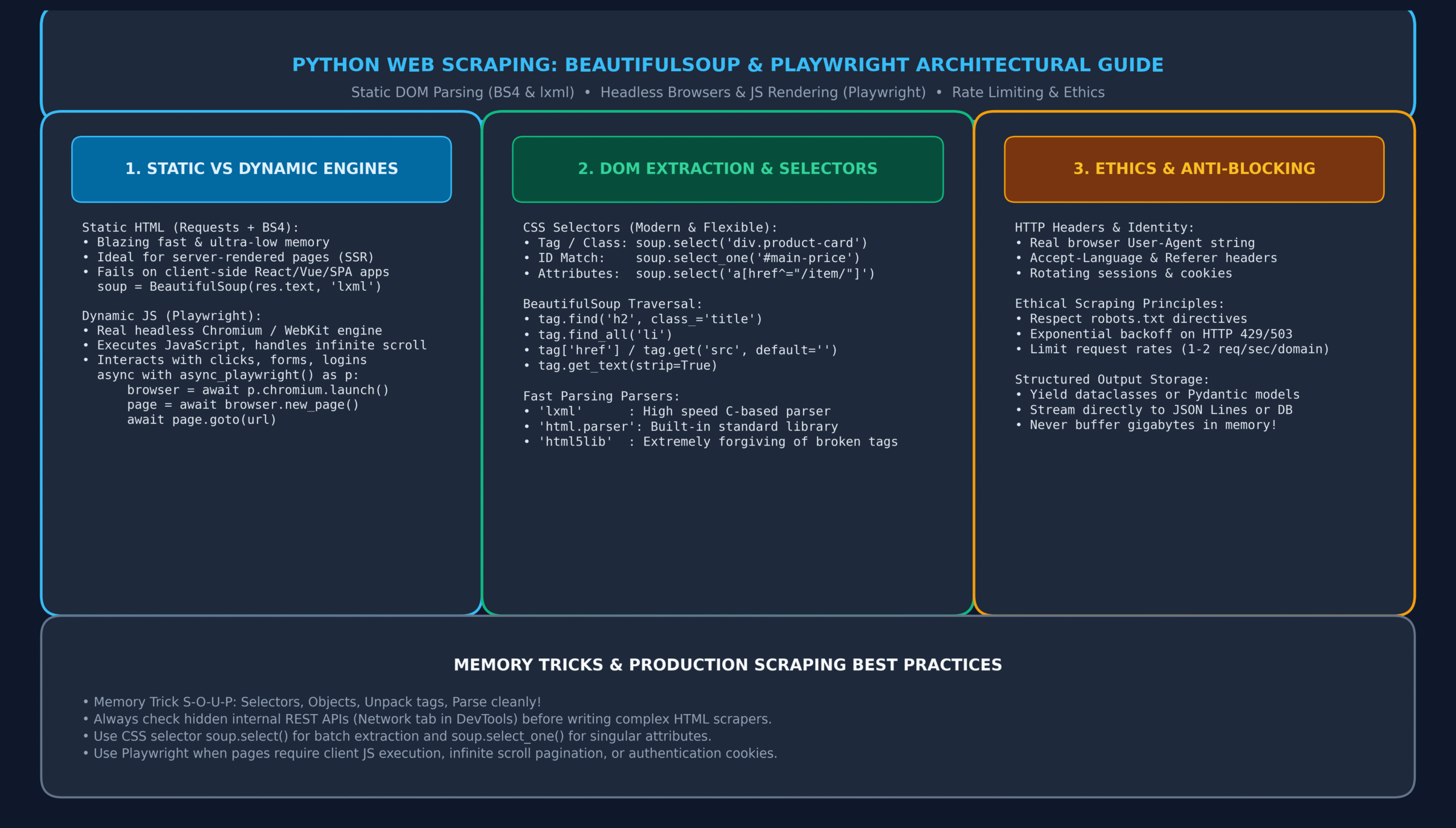
Figure 1: Python Web Scraping Architecture: Static Requests/BS4 vs Dynamic Playwright, Selectors, and Ethics.
10. Anti-Bot Defenses, Rate Limiting & robots.txt Ethics
1. Ethical robots.txt Compliance
Before scraping any domain, programmatically check its
robots.txtfile to respect the webmaster’s crawl directives:import urllib.robotparser rp = urllib.robotparser.RobotFileParser() rp.set_url("https://example.com/robots.txt") rp.read() user_agent = "MyFriendlyResearchBot" target_url = "https://example.com/admin/private-data" can_fetch = rp.can_fetch(user_agent, target_url) print(f"Allowed to scrape {target_url}? -> {can_fetch}")2. Rate Limiting and Exponential Backoff
Never spam target servers with unconstrained concurrent requests. Implement delay jitter and back off exponentially when encountering HTTP 429 (Too Many Requests) or HTTP 503 (Service Unavailable):
import time import random import requests def resilient_get(url: str, max_retries: int = 4) -> requests.Response: delay = 1.0 for attempt in range(max_retries): res = requests.get(url, headers={"User-Agent": "Mozilla/5.0"}) if res.status_code == 200: return res elif res.status_code in (429, 503): # Exponential backoff with random jitter sleep_time = delay + random.uniform(0.5, 1.5) print(f"Rate limited (status {res.status_code}). Backing off for {sleep_time:.2f}s...") time.sleep(sleep_time) delay *= 2 else: res.raise_for_status() raise RuntimeError(f"Failed to fetch {url} after {max_retries} attempts.")11. Production Project: Resilient E-Commerce Scraper & JSON Pipeline
Let us assemble a complete production scraping pipeline that crawls paginated product catalogs, extracts clean structured attributes, handles missing elements defensively, and serializes the records to JSON Lines:
import json import time from typing import NamedTuple, Generator import requests from bs4 import BeautifulSoup class ProductRecord(NamedTuple): title: str price: float currency: str rating: str availability: bool product_url: str class ECommerceScraperPipeline: def __init__(self, base_url: str): self.base_url = base_url.rstrip("/") self.session = requests.Session() self.session.headers.update({ "User-Agent": "Mozilla/5.0 (Windows NT 10.0; Win64; x64) AppleWebKit/537.36 (KHTML, like Gecko) Chrome/124.0.0.0 Safari/537.36", "Accept-Language": "en-US,en;q=0.9" }) def _parse_page_html(self, html: str) -> list[ProductRecord]: soup = BeautifulSoup(html, "lxml") records = [] # Find all product containers articles = soup.select("article.product_pod") for art in articles: # 1. Title Extraction h3_link = art.select_one("h3 a") title = h3_link.get("title", "").strip() if h3_link else "Untitled" # 2. Price Parsing (e.g. "£51.77") price_el = art.select_one("p.price_color") price_str = price_el.get_text(strip=True) if price_el else "£0.0" currency = price_str[0] if price_str else "" raw_val = price_str[1:] if len(price_str) > 1 else "0" try: price = float(raw_val) except ValueError: price = 0.0 # 3. Rating Class rating_el = art.select_one("p.star-rating") rating_classes = rating_el.get("class", []) if rating_el else [] rating = next((c for c in rating_classes if c != "star-rating"), "None") # 4. Availability avail_el = art.select_one("p.instock.availability") availability = "In stock" in avail_el.get_text() if avail_el else False # 5. Detail Link rel_link = h3_link.get("href", "") if h3_link else "" full_url = f"{self.base_url}/{rel_link.lstrip('/')}" records.append(ProductRecord( title=title, price=price, currency=currency, rating=rating, availability=availability, product_url=full_url )) return records def crawl_catalog(self, total_pages: int = 2) -> Generator[ProductRecord, None, None]: for page_num in range(1, total_pages + 1): url = f"{self.base_url}/catalogue/page-{page_num}.html" print(f"Scraping page {page_num}: {url}...") try: res = self.session.get(url, timeout=10) if res.status_code == 200: records = self._parse_page_html(res.text) for r in records: yield r else: print(f"Page {page_num} returned status {res.status_code}, stopping.") break except Exception as e: print(f"Error fetching page {page_num}: {e}") break time.sleep(1.0) # Polite 1-second delay between page requests # Execution and JSON Lines Export if __name__ == "__main__": scraper = ECommerceScraperPipeline("http://books.toscrape.com") output_filename = "scraped_products.jsonl" count = 0 with open(output_filename, "w", encoding="utf-8") as f: for record in scraper.crawl_catalog(total_pages=2): f.write(json.dumps(record._asdict()) + "\n") count += 1 print(f"Successfully scraped {count} products and wrote to {output_filename}!")12. Memory Tricks & Mnemonics for Fast Recall
🧠 S-O-U-P Mnemonic
Selectors match elements
Objects structure the tree
Unpack tags safely with.get()
Parse fast with'lxml'!
Remember: Never access tag[‘attr’] directly without checking if tag exists!🧠 P-A-G-E Mnemonic
Playwright
Automates
Graphical / JS
Execution!
Remember: Use Playwright when client-side React/Vue renders the content.🧠 H-E-A-D-E-R Mnemonic
Help
Every
Automated
Daemon
Emulate
Real users!
Remember: Always set User-Agent and Accept-Language headers.13. One-Page Revision Cheat Sheet (Print Ready)
Use this cheat sheet as a quick reference for technical interviews and day-to-day web scraper authoring:
Operation Syntax / Method Description / Best Practice Fast HTML Parsing BeautifulSoup(html, “lxml”) Uses C-based lxml parser for maximum speed and tag recovery. First Match Selector soup.select_one(“div.card”) Returns first matching Tag object, or Noneif missing.All Matches Selector soup.select(“li.item”) Returns a Python list containing all matching Tag elements. Clean Text Extraction tag.get_text(strip=True) Strips whitespace and newlines from all enclosed text nodes. Safe Attribute Access tag.get(“href”, “”) Safely retrieves attribute value without raising KeyError if absent. Launch Headless Browser await p.chromium.launch(headless=True) Launches lightweight headless Chromium instance via Playwright. Wait for Element await page.wait_for_selector(“.feed”) Waits asynchronously for client-rendered dynamic content to mount. Intercept API Traffic page.on(“response”, callback) Captures pristine JSON responses emitted by backend microservices. Respect Robots Directives rp.can_fetch(agent, url) Validates crawling permissions against site robots.txt policy. Session Persistence session = requests.Session() Maintains TCP connection pools and cookie jars across multiple requests. 14. 20 Practice MCQs with Answers and Detailed Explanations
Q1. What is the fundamental limitation of using requests and BeautifulSoup for web scraping?
- A) They cannot parse HTML5 tags
- B) They cannot execute client-side JavaScript or render Single Page Applications (SPAs)
- C) They are limited to 10 requests per minute by Python’s runtime
- D) They cannot handle SSL/TLS HTTPS connections
View Answer & Explanation
Correct Answer: B
Explanation:
requestsmerely downloads the raw HTTP response string. Because it lacks a JavaScript V8 engine, it cannot execute client-side scripts to render React, Vue, or Angular applications.Q2. Which underlying parser provides the fastest execution speed when initializing BeautifulSoup?
- A) html.parser
- B) lxml
- C) html5lib
- D) regex.parser
View Answer & Explanation
Correct Answer: B
Explanation:
lxmlis written in optimized C code and is dramatically faster than the pure Python parsers (html.parserandhtml5lib), making it the standard choice for high-throughput scraping.Q3. What does soup.select_one(“div.product”) return if no matching div element exists in the document?
- A) An empty list []
- B) An empty string “”
- C) None
- D) Raises a TagNotFoundError
View Answer & Explanation
Correct Answer: C
Explanation:
select_one()(andfind()) returnNonewhen no matching tag is found, allowing developers to write clean conditional checks (e.g.if tag is not None:).Q4. What is the safest way to extract an attribute from a BeautifulSoup Tag object without risking a KeyError?
- A) tag[‘href’]
- B) tag.get(‘href’, ‘default’)
- C) tag.attr(‘href’)
- D) tag.read(‘href’)
View Answer & Explanation
Correct Answer: B
Explanation: Similar to standard Python dictionaries,
tag.get(key, default)returns the default value (orNone) if the attribute does not exist, whereas bracket syntaxtag[key]raises aKeyError.Q5. Which CSS selector selects all <a> tags whose href attribute starts with https://api?
- A) a[href*=”https://api”]
- B) a[href^=”https://api”]
- C) a[href$=”https://api”]
- D) a[href=”https://api%”]
View Answer & Explanation
Correct Answer: B
Explanation: In CSS selectors, the caret
^=matches attribute prefixes (starts-with), the dollar sign$=matches suffixes (ends-with), and the asterisk*=matches substrings (contains).Q6. Why do web servers frequently return HTTP 403 Forbidden to default requests.get() calls?
- A) Python does not support HTTP 2.0 protocol
- B) The default User-Agent header identifies the client as a Python bot (e.g. python-requests/2.x)
- C) Web servers require all connections to use WebSocket handshake
- D) Python cannot compute TCP checksums
View Answer & Explanation
Correct Answer: B
Explanation: Web Application Firewalls (WAFs) immediately flag or block known programmatic User-Agents like
python-requests. OverridingUser-Agentwith a genuine browser string resolves this issue.Q7. What is the main advantage of using requests.Session() over standalone requests.get() calls?
- A) Automatically bypasses all CAPTCHA challenges
- B) Persists cookies across requests and reuses underlying TCP connections via HTTP Keep-Alive
- C) Automatically converts HTML responses into Pandas DataFrames
- D) Renders React client-side components
View Answer & Explanation
Correct Answer: B
Explanation:
requests.Session()retains cookies (session authentication) and avoids repeated TCP handshakes and TLS negotiations by maintaining a persistent connection pool, speeding up multi-page scraping.Q8. How does Playwright handle waiting for dynamic elements to load?
- A) Developers must insert arbitrary time.sleep(10) calls everywhere
- B) It features built-in auto-waiting for actionability and explicit wait_for_selector() promises
- C) It checks the operating system CPU load
- D) It uses threading.Condition variables
View Answer & Explanation
Correct Answer: B
Explanation: Playwright performs auto-waiting before performing actions (clicks, fills) to verify that target elements are visible, attached to the DOM, and enabled, eliminating flaky scraping timeouts.
Q9. What standard Python library module is used to parse and enforce a website’s robots.txt rules?
- A) urllib.robotparser
- B) http.robots
- C) bs4.robots
- D) xml.etree.robot
View Answer & Explanation
Correct Answer: A
Explanation: Python includes
urllib.robotparser.RobotFileParser()in its standard library to fetch, parse, and verify whether a specific user-agent is permitted to fetch a given URL.Q10. What HTTP status code specifically signals that your scraper is sending requests too quickly and being throttled?
- A) 400 Bad Request
- B) 404 Not Found
- C) 429 Too Many Requests
- D) 500 Internal Server Error
View Answer & Explanation
Correct Answer: C
Explanation: HTTP 429 indicates that the user has sent too many requests in a given amount of time (rate limiting). Resilient scrapers must back off and delay subsequent calls upon seeing HTTP 429.
Q11. What is the difference between tag.text and tag.get_text(strip=True)?
- A) tag.text preserves all raw whitespace, tabs, and newline characters; strip=True removes leading/trailing spaces
- B) tag.text returns HTML tags; get_text() removes tags
- C) tag.text only works on <p> tags
- D) There is no functional difference
View Answer & Explanation
Correct Answer: A
Explanation:
tag.textretains formatting characters (including multi-line indents and newlines).get_text(strip=True)strips excessive whitespace from the extracted text string.Q12. In Playwright, how can you trigger content loading on an infinite scrolling webpage?
- A) Call page.reload() repeatedly
- B) Execute JavaScript to scroll window down: await page.evaluate(“window.scrollTo(0, document.body.scrollHeight)”)
- C) Send a GET request to /infinite-scroll
- D) Increase the browser viewport width
View Answer & Explanation
Correct Answer: B
Explanation: Using
page.evaluate()to execute JavaScript that scrolls to the bottom of the document triggers the page’s event listener to fire AJAX requests and fetch subsequent batches of items.Q13. What is the most efficient way to scrape a modern Single Page App (SPA) that loads data via background JSON endpoints?
- A) Take screenshots of the page and run OCR (Optical Character Recognition)
- B) Inspect the browser Network tab, locate the internal REST API endpoint, and request the JSON payload directly
- C) Parse the minified bundle.js file using regex
- D) Use Selenium to select every table cell one by one
View Answer & Explanation
Correct Answer: B
Explanation: Almost all modern SPAs make asynchronous AJAX/fetch calls to clean internal REST or GraphQL APIs. Bypassing HTML scraping entirely and requesting the backend API directly is 100x faster and far more robust.
Q14. What does the CSS selector div.product > a indicate?
- A) Any <a> tag nested anywhere inside div.product
- B) Only <a> tags that are immediate direct children of div.product
- C) Any <div> tag that follows an <a> tag
- D) Links whose href attribute is greater than 0
View Answer & Explanation
Correct Answer: B
Explanation: The child combinator
>selects only elements that are immediate direct children of the parent element, whereas a space combinator selects any descendant regardless of nesting depth.Q15. Why should large-scale scrapers export scraped data to JSON Lines (.jsonl) rather than a single monolithic JSON file (.json)?
- A) JSON Lines files are automatically encrypted
- B) JSON Lines allows streaming records one line at a time without keeping the entire dataset in RAM or losing progress if the scraper crashes
- C) Standard JSON is limited to 1,000 objects
- D) JSON Lines compresses data by 80% automatically
View Answer & Explanation
Correct Answer: B
Explanation: JSON Lines (.jsonl) contains one valid JSON object per line. Scrapers append records line-by-line, preventing catastrophic data loss if network errors occur mid-crawl and requiring $O(1)$ memory.
Q16. How does Playwright differ from legacy Selenium WebDriver?
- A) Playwright uses direct WebSocket DevTools protocol connections to the browser rather than HTTP-based WebDriver wrappers
- B) Selenium cannot take screenshots
- C) Playwright only supports Google Chrome on Linux
- D) Playwright cannot execute JavaScript
View Answer & Explanation
Correct Answer: A
Explanation: Playwright communicates directly with modern browser engines (Chromium, Firefox, WebKit) via bi-directional DevTools WebSocket connections, resulting in dramatically faster execution and auto-waiting compared to Selenium’s HTTP roundtrips.
Q17. What technique helps prevent IP-level rate limiting when scraping millions of pages across an enterprise domain?
- A) Using rotating residential or datacenter proxy pools alongside randomized delays
- B) Disabling HTTP keep-alive
- C) Changing the local system clock
- D) Compiling Python with CPython flags
View Answer & Explanation
Correct Answer: A
Explanation: Rotating outbound requests across a large pool of proxy IP addresses combined with delay jitter prevents single IP request counts from exceeding server rate thresholds.
Q18. What does soup.find_all(True) return?
- A) An error because True is not a tag name
- B) All tags in the document that have boolean attributes
- C) Every single HTML tag in the document
- D) Only <html> and <body> tags
View Answer & Explanation
Correct Answer: C
Explanation: In BeautifulSoup, passing the boolean value
Trueas a filter matches everything. Therefore,soup.find_all(True)returns a list of every tag in the document tree.Q19. What should your scraper do when receiving an HTTP 503 Service Unavailable error with exponential backoff?
- A) Immediately send 10 concurrent retry requests
- B) Pause execution, double the delay interval with random jitter, and retry up to a reasonable limit
- C) Delete all previously scraped data
- D) Terminate the Python interpreter with an exit code of 1
View Answer & Explanation
Correct Answer: B
Explanation: Exponential backoff relieves pressure on congested web servers by progressively increasing wait times before retrying failed requests.
Q20. In terms of legal compliance in the United States (hiQ Labs v. LinkedIn), what is the legal status of scraping publicly available web data?
- A) Scraping any website is a federal felony under the CFAA
- B) Accessing publicly available data that is not behind authentication or password gates does not violate the Computer Fraud and Abuse Act (CFAA)
- C) Scraping is only legal if the scraper is written in Python
- D) Only non-profit universities are permitted to scrape public data
View Answer & Explanation
Correct Answer: B
Explanation: Key legal precedents (e.g. hiQ Labs v. LinkedIn) established that scraping publicly accessible data without bypassing an authentication gate does not constitute unauthorized access under the CFAA, though scrapers must still comply with terms of service, copyright, and server stability.
15. Related Python Lessons & Further Reading
Elevate your data extraction and backend engineering capabilities by exploring these interconnected tutorials in our complete curriculum:
- Consuming REST APIs with Python: The Complete Requests Library & HTTP Masterclass
- Python AsyncIO Tutorial: Complete Guide to async/await, Event Loops & Concurrency
- Python Regular Expressions (re): Complete Guide to Regex, Groups & Parsing
- Python JSON and CSV: The Complete Guide to Serialization, DictReader & APIs
- Python File Handling: The Complete Guide to Reading, Writing & Context Managers
- Python Multithreading vs Multiprocessing: Complete Concurrency & GIL Guide
{
“@context”: “https://schema.org”,
“@type”: “TechArticle”,
“headline”: “Python Web Scraping with BeautifulSoup and Playwright: The Complete Guide (with 20 MCQs)”,
“description”: “Master Python web scraping with BeautifulSoup and Playwright. Learn CSS selectors, dynamic JS rendering, rate limiting, and 20 practice MCQs.”,
“keywords”: “Python Web Scraping BeautifulSoup, BeautifulSoup tutorial, Playwright Python, web scraping, CSS selectors, headless browser, DOM parsing”,
“url”: “https://it2edu.com/learn-programming/python/python-web-scraping-guide/”,
“articleSection”: “Python”,
“inLanguage”: “en-US”,
“author”: {
“@type”: “Organization”,
“name”: “it2edu”
},
“publisher”: {
“@type”: “Organization”,
“name”: “it2edu”,
“url”: “https://it2edu.com”
}
}
